中繼資料與文件 URL
你可以在你的 FastAPI 應用程式中自訂多項中繼資料設定。
API 的中繼資料
你可以設定下列欄位,這些欄位會用在 OpenAPI 規格與自動產生的 API 文件介面中:
| 參數 | 型別 | 說明 | ||||||||||||
|---|---|---|---|---|---|---|---|---|---|---|---|---|---|---|
title |
str |
API 的標題。 | ||||||||||||
summary |
str |
API 的簡短摘要。自 OpenAPI 3.1.0、FastAPI 0.99.0 起可用。 | ||||||||||||
description |
str |
API 的簡短說明。可使用 Markdown。 | ||||||||||||
version |
string |
API 的版本號。這是你自己的應用程式版本,不是 OpenAPI 的版本,例如 2.5.0。 |
||||||||||||
terms_of_service |
str |
指向 API 服務條款的 URL。若提供,必須是 URL。 | ||||||||||||
contact |
dict |
對外公開的 API 聯絡資訊。可包含多個欄位。
|
| 參數 | 型別 | 說明 |
|---|---|---|
name | str | 聯絡人/組織的識別名稱。 |
url | str | 指向聯絡資訊的 URL。必須是 URL 格式。 |
email | str | 聯絡人/組織的電子郵件地址。必須是電子郵件格式。 |
license_infodictlicense_info 欄位
| 參數 | 型別 | 說明 |
|---|---|---|
name | str | 必填(若有設定 license_info)。API 使用的授權名稱。 |
identifier | str | API 的 SPDX 授權表示式。identifier 欄位與 url 欄位互斥。自 OpenAPI 3.1.0、FastAPI 0.99.0 起可用。 |
url | str | API 所採用授權的 URL。必須是 URL 格式。 |
你可以這樣設定它們:
from fastapi import FastAPI

description = """
ChimichangApp API helps you do awesome stuff. 🚀

## Items

You can **read items**.

## Users

You will be able to:

* **Create users** (_not implemented_).
* **Read users** (_not implemented_).
"""

app = FastAPI(
    title="ChimichangApp",
    description=description,
    summary="Deadpool's favorite app. Nuff said.",
    version="0.0.1",
    terms_of_service="http://example.com/terms/",
    contact={
        "name": "Deadpoolio the Amazing",
        "url": "http://x-force.example.com/contact/",
        "email": "dp@x-force.example.com",
    },
    license_info={
        "name": "Apache 2.0",
        "url": "https://www.apache.org/licenses/LICENSE-2.0.html",
    },
)


@app.get("/items/")
async def read_items():
    return [{"name": "Katana"}]
提示
你可以在 description 欄位中撰寫 Markdown,輸出時會被正確渲染。
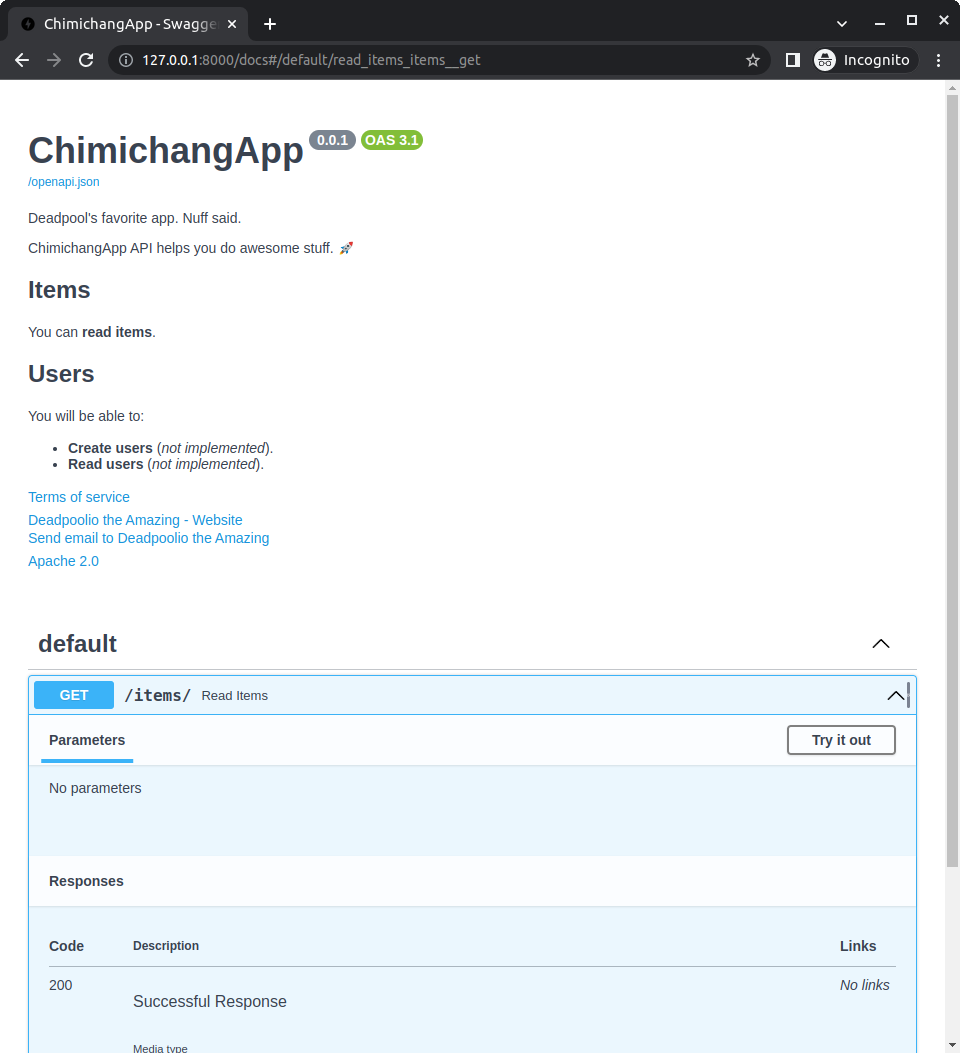
使用這些設定後,自動產生的 API 文件會像這樣:
授權識別碼
自 OpenAPI 3.1.0 與 FastAPI 0.99.0 起,你也可以在 license_info 中使用 identifier 來取代 url。
例如:
from fastapi import FastAPI

description = """
ChimichangApp API helps you do awesome stuff. 🚀

## Items

You can **read items**.

## Users

You will be able to:

* **Create users** (_not implemented_).
* **Read users** (_not implemented_).
"""

app = FastAPI(
    title="ChimichangApp",
    description=description,
    summary="Deadpool's favorite app. Nuff said.",
    version="0.0.1",
    terms_of_service="http://example.com/terms/",
    contact={
        "name": "Deadpoolio the Amazing",
        "url": "http://x-force.example.com/contact/",
        "email": "dp@x-force.example.com",
    },
    license_info={
        "name": "Apache 2.0",
        "identifier": "Apache-2.0",
    },
)


@app.get("/items/")
async def read_items():
    return [{"name": "Katana"}]
標籤的中繼資料
你也可以透過 openapi_tags 參數,為用來分組你的路徑操作(path operation)的各個標籤加入額外中繼資料。
它接收一個 list,其中每個標籤對應一個 dictionary。
每個 dictionary 可包含:
name(必填):一個str,其值需與你在路徑操作與APIRouters 的tags參數中使用的標籤名稱相同。description:一個str,為該標籤的簡短描述。可使用 Markdown,並會顯示在文件介面中。externalDocs:一個dict,描述外部文件,包含:description:一個str,外部文件的簡短描述。url(必填):一個str,外部文件的 URL。
建立標籤的中繼資料
我們用 users 與 items 兩個標籤來示範。
先為你的標籤建立中繼資料,然後將它傳給 openapi_tags 參數:
from fastapi import FastAPI

tags_metadata = [
    {
        "name": "users",
        "description": "Operations with users. The **login** logic is also here.",
    },
    {
        "name": "items",
        "description": "Manage items. So _fancy_ they have their own docs.",
        "externalDocs": {
            "description": "Items external docs",
            "url": "https://fastapi.tiangolo.com/",
        },
    },
]

app = FastAPI(openapi_tags=tags_metadata)


@app.get("/users/", tags=["users"])
async def get_users():
    return [{"name": "Harry"}, {"name": "Ron"}]


@app.get("/items/", tags=["items"])
async def get_items():
    return [{"name": "wand"}, {"name": "flying broom"}]
注意你可以在描述中使用 Markdown,例如「login」會以粗體(login)顯示,而「fancy」會以斜體(fancy)顯示。
提示
你不必為你使用到的每個標籤都加入中繼資料。
使用你的標籤
在你的路徑操作(以及 APIRouters)上使用 tags 參數,將它們歸類到不同標籤下:
from fastapi import FastAPI

tags_metadata = [
    {
        "name": "users",
        "description": "Operations with users. The **login** logic is also here.",
    },
    {
        "name": "items",
        "description": "Manage items. So _fancy_ they have their own docs.",
        "externalDocs": {
            "description": "Items external docs",
            "url": "https://fastapi.tiangolo.com/",
        },
    },
]

app = FastAPI(openapi_tags=tags_metadata)


@app.get("/users/", tags=["users"])
async def get_users():
    return [{"name": "Harry"}, {"name": "Ron"}]


@app.get("/items/", tags=["items"])
async def get_items():
    return [{"name": "wand"}, {"name": "flying broom"}]
資訊
在 Path Operation Configuration 中閱讀更多關於標籤的內容。
檢視文件
現在檢視文件時,會看到所有額外的中繼資料:

標籤順序
每個標籤中繼資料 dictionary 在清單中的順序,也會決定它們在文件介面中的顯示順序。
例如,雖然按字母排序時 users 會排在 items 之後,但因為我們在清單中將它的中繼資料放在第一個,所以它會先顯示。
OpenAPI URL
預設情況下,OpenAPI 綱要(schema)會提供在 /openapi.json。
但你可以用 openapi_url 參數來調整。
例如,將它設定為提供在 /api/v1/openapi.json:
from fastapi import FastAPI

app = FastAPI(openapi_url="/api/v1/openapi.json")


@app.get("/items/")
async def read_items():
    return [{"name": "Foo"}]
如果你想完全停用 OpenAPI 綱要,可以設定 openapi_url=None,同時也會停用依賴它的文件使用者介面。
文件 URL
你可以設定內建的兩個文件使用者介面:
- Swagger UI:提供於
/docs。- 可用
docs_url參數設定其 URL。 - 設定
docs_url=None可停用。
- 可用
- ReDoc:提供於
/redoc。- 可用
redoc_url參數設定其 URL。 - 設定
redoc_url=None可停用。
- 可用
例如,將 Swagger UI 提供於 /documentation,並停用 ReDoc:
from fastapi import FastAPI

app = FastAPI(docs_url="/documentation", redoc_url=None)


@app.get("/items/")
async def read_items():
    return [{"name": "Foo"}]