Swagger UI の設定
🌐 AI と人間による翻訳
この翻訳は、人間のガイドに基づいて AI によって作成されました。🤝
原文の意図を取り違えていたり、不自然な表現になっている可能性があります。🤖
AI LLM をより適切に誘導するのを手伝う ことで、この翻訳を改善できます。
いくつかの追加の Swagger UI パラメータを設定できます。
設定するには、FastAPI() のアプリオブジェクトを作成するとき、または get_swagger_ui_html() 関数に swagger_ui_parameters 引数を渡します。
swagger_ui_parameters は、Swagger UI に直接渡される設定を含む辞書を受け取ります。
FastAPI はそれらの設定を JSON に変換し、JavaScript と互換にします。Swagger UI が必要とするのはこの形式です。
シンタックスハイライトを無効化
例えば、Swagger UI のシンタックスハイライトを無効化できます。
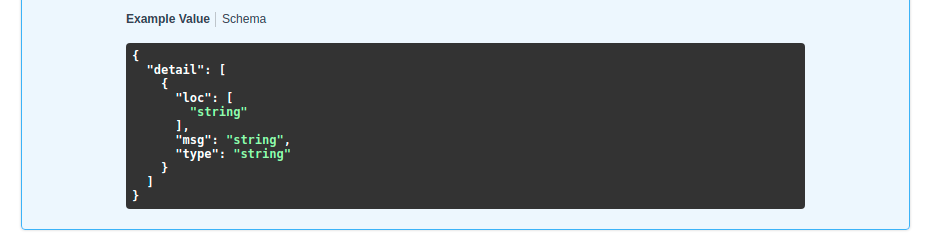
設定を変更しなければ、シンタックスハイライトはデフォルトで有効です:
しかし、syntaxHighlight を False に設定すると無効化できます:
from fastapi import FastAPI

app = FastAPI(swagger_ui_parameters={"syntaxHighlight": False})


@app.get("/users/{username}")
async def read_user(username: str):
    return {"message": f"Hello {username}"}
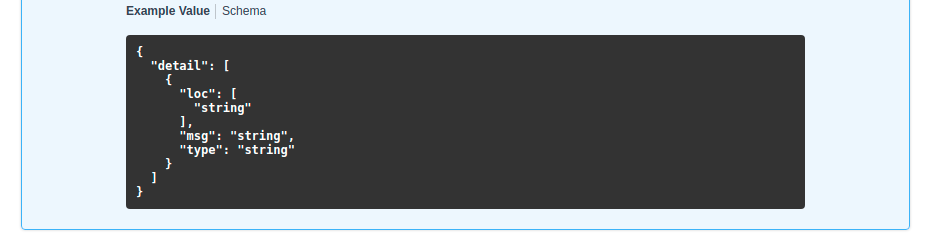
...その場合、Swagger UI ではシンタックスハイライトが表示されなくなります:
テーマの変更
同様に、キー "syntaxHighlight.theme"(途中にドットが含まれている点に注意)でシンタックスハイライトのテーマを設定できます:
from fastapi import FastAPI

app = FastAPI(swagger_ui_parameters={"syntaxHighlight": {"theme": "obsidian"}})


@app.get("/users/{username}")
async def read_user(username: str):
    return {"message": f"Hello {username}"}
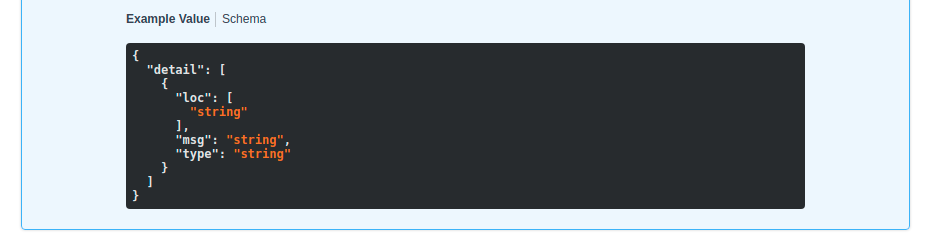
この設定により、シンタックスハイライトの配色テーマが変わります:
既定の Swagger UI パラメータの変更
FastAPI には、多くのユースケースに適した既定の設定パラメータが含まれています。
既定では次の設定が含まれます:
# Code above omitted 👆

def _html_safe_json(value: Any) -> str:
    """Serialize a value to JSON with HTML special characters escaped.

    This prevents injection when the JSON is embedded inside a <script> tag.
    """
    return (
        json.dumps(value)
        .replace("<", "\\u003c")
        .replace(">", "\\u003e")
        .replace("&", "\\u0026")
    )


swagger_ui_default_parameters: Annotated[
    dict[str, Any],
    Doc(

# Code below omitted 👇
👀 Full file preview
import json
from typing import Annotated, Any

from annotated_doc import Doc
from fastapi.encoders import jsonable_encoder
from starlette.responses import HTMLResponse


def _html_safe_json(value: Any) -> str:
    """Serialize a value to JSON with HTML special characters escaped.

    This prevents injection when the JSON is embedded inside a <script> tag.
    """
    return (
        json.dumps(value)
        .replace("<", "\\u003c")
        .replace(">", "\\u003e")
        .replace("&", "\\u0026")
    )


swagger_ui_default_parameters: Annotated[
    dict[str, Any],
    Doc(
        """
        Default configurations for Swagger UI.

        You can use it as a template to add any other configurations needed.
        """
    ),
] = {
    "dom_id": "#swagger-ui",
    "layout": "BaseLayout",
    "deepLinking": True,
    "showExtensions": True,
    "showCommonExtensions": True,
}


def get_swagger_ui_html(
    *,
    openapi_url: Annotated[
        str,
        Doc(
            """
            The OpenAPI URL that Swagger UI should load and use.

            This is normally done automatically by FastAPI using the default URL
            `/openapi.json`.

            Read more about it in the
            [FastAPI docs for Conditional OpenAPI](https://fastapi.tiangolo.com/how-to/conditional-openapi/#conditional-openapi-from-settings-and-env-vars)
            """
        ),
    ],
    title: Annotated[
        str,
        Doc(
            """
            The HTML `<title>` content, normally shown in the browser tab.

            Read more about it in the
            [FastAPI docs for Custom Docs UI Static Assets](https://fastapi.tiangolo.com/how-to/custom-docs-ui-assets/)
            """
        ),
    ],
    swagger_js_url: Annotated[
        str,
        Doc(
            """
            The URL to use to load the Swagger UI JavaScript.

            It is normally set to a CDN URL.

            Read more about it in the
            [FastAPI docs for Custom Docs UI Static Assets](https://fastapi.tiangolo.com/how-to/custom-docs-ui-assets/)
            """
        ),
    ] = "https://cdn.jsdelivr.net/npm/swagger-ui-dist@5/swagger-ui-bundle.js",
    swagger_css_url: Annotated[
        str,
        Doc(
            """
            The URL to use to load the Swagger UI CSS.

            It is normally set to a CDN URL.

            Read more about it in the
            [FastAPI docs for Custom Docs UI Static Assets](https://fastapi.tiangolo.com/how-to/custom-docs-ui-assets/)
            """
        ),
    ] = "https://cdn.jsdelivr.net/npm/swagger-ui-dist@5/swagger-ui.css",
    swagger_favicon_url: Annotated[
        str,
        Doc(
            """
            The URL of the favicon to use. It is normally shown in the browser tab.
            """
        ),
    ] = "https://fastapi.tiangolo.com/img/favicon.png",
    oauth2_redirect_url: Annotated[
        str | None,
        Doc(
            """
            The OAuth2 redirect URL, it is normally automatically handled by FastAPI.

            Read more about it in the
            [FastAPI docs for Custom Docs UI Static Assets](https://fastapi.tiangolo.com/how-to/custom-docs-ui-assets/)
            """
        ),
    ] = None,
    init_oauth: Annotated[
        dict[str, Any] | None,
        Doc(
            """
            A dictionary with Swagger UI OAuth2 initialization configurations.

            Read more about the available configuration options in the
            [Swagger UI docs](https://swagger.io/docs/open-source-tools/swagger-ui/usage/oauth2/).
            """
        ),
    ] = None,
    swagger_ui_parameters: Annotated[
        dict[str, Any] | None,
        Doc(
            """
            Configuration parameters for Swagger UI.

            It defaults to [swagger_ui_default_parameters][fastapi.openapi.docs.swagger_ui_default_parameters].

            Read more about it in the
            [FastAPI docs about how to Configure Swagger UI](https://fastapi.tiangolo.com/how-to/configure-swagger-ui/).
            """
        ),
    ] = None,
) -> HTMLResponse:
    """
    Generate and return the HTML  that loads Swagger UI for the interactive
    API docs (normally served at `/docs`).

    You would only call this function yourself if you needed to override some parts,
    for example the URLs to use to load Swagger UI's JavaScript and CSS.

    Read more about it in the
    [FastAPI docs for Configure Swagger UI](https://fastapi.tiangolo.com/how-to/configure-swagger-ui/)
    and the [FastAPI docs for Custom Docs UI Static Assets (Self-Hosting)](https://fastapi.tiangolo.com/how-to/custom-docs-ui-assets/).
    """
    current_swagger_ui_parameters = swagger_ui_default_parameters.copy()
    if swagger_ui_parameters:
        current_swagger_ui_parameters.update(swagger_ui_parameters)

    html = f"""
    <!DOCTYPE html>
    <html>
    <head>
    <meta name="viewport" content="width=device-width, initial-scale=1.0">
    <link type="text/css" rel="stylesheet" href="{swagger_css_url}">
    <link rel="shortcut icon" href="{swagger_favicon_url}">
    <title>{title}</title>
    </head>
    <body>
    <div id="swagger-ui">
    </div>
    <script src="{swagger_js_url}"></script>
    <!-- `SwaggerUIBundle` is now available on the page -->
    <script>
    const ui = SwaggerUIBundle({{
        url: '{openapi_url}',
    """

    for key, value in current_swagger_ui_parameters.items():
        html += f"{_html_safe_json(key)}: {_html_safe_json(jsonable_encoder(value))},\n"

    if oauth2_redirect_url:
        html += f"oauth2RedirectUrl: window.location.origin + '{oauth2_redirect_url}',"

    html += """
    presets: [
        SwaggerUIBundle.presets.apis,
        SwaggerUIBundle.SwaggerUIStandalonePreset
        ],
    })"""

    if init_oauth:
        html += f"""
        ui.initOAuth({_html_safe_json(jsonable_encoder(init_oauth))})
        """

    html += """
    </script>
    </body>
    </html>
    """
    return HTMLResponse(html)


def get_redoc_html(
    *,
    openapi_url: Annotated[
        str,
        Doc(
            """
            The OpenAPI URL that ReDoc should load and use.

            This is normally done automatically by FastAPI using the default URL
            `/openapi.json`.

            Read more about it in the
            [FastAPI docs for Conditional OpenAPI](https://fastapi.tiangolo.com/how-to/conditional-openapi/#conditional-openapi-from-settings-and-env-vars)
            """
        ),
    ],
    title: Annotated[
        str,
        Doc(
            """
            The HTML `<title>` content, normally shown in the browser tab.

            Read more about it in the
            [FastAPI docs for Custom Docs UI Static Assets](https://fastapi.tiangolo.com/how-to/custom-docs-ui-assets/)
            """
        ),
    ],
    redoc_js_url: Annotated[
        str,
        Doc(
            """
            The URL to use to load the ReDoc JavaScript.

            It is normally set to a CDN URL.

            Read more about it in the
            [FastAPI docs for Custom Docs UI Static Assets](https://fastapi.tiangolo.com/how-to/custom-docs-ui-assets/)
            """
        ),
    ] = "https://cdn.jsdelivr.net/npm/redoc@2/bundles/redoc.standalone.js",
    redoc_favicon_url: Annotated[
        str,
        Doc(
            """
            The URL of the favicon to use. It is normally shown in the browser tab.
            """
        ),
    ] = "https://fastapi.tiangolo.com/img/favicon.png",
    with_google_fonts: Annotated[
        bool,
        Doc(
            """
            Load and use Google Fonts.
            """
        ),
    ] = True,
) -> HTMLResponse:
    """
    Generate and return the HTML response that loads ReDoc for the alternative
    API docs (normally served at `/redoc`).

    You would only call this function yourself if you needed to override some parts,
    for example the URLs to use to load ReDoc's JavaScript and CSS.

    Read more about it in the
    [FastAPI docs for Custom Docs UI Static Assets (Self-Hosting)](https://fastapi.tiangolo.com/how-to/custom-docs-ui-assets/).
    """
    html = f"""
    <!DOCTYPE html>
    <html>
    <head>
    <title>{title}</title>
    <!-- needed for adaptive design -->
    <meta charset="utf-8"/>
    <meta name="viewport" content="width=device-width, initial-scale=1">
    """
    if with_google_fonts:
        html += """
    <link href="https://fonts.googleapis.com/css?family=Montserrat:300,400,700|Roboto:300,400,700" rel="stylesheet">
    """
    html += f"""
    <link rel="shortcut icon" href="{redoc_favicon_url}">
    <!--
    ReDoc doesn't change outer page styles
    -->
    <style>
      body {{
        margin: 0;
        padding: 0;
      }}
    </style>
    </head>
    <body>
    <noscript>
        ReDoc requires Javascript to function. Please enable it to browse the documentation.
    </noscript>
    <redoc spec-url="{openapi_url}"></redoc>
    <script src="{redoc_js_url}"> </script>
    </body>
    </html>
    """
    return HTMLResponse(html)


def get_swagger_ui_oauth2_redirect_html() -> HTMLResponse:
    """
    Generate the HTML response with the OAuth2 redirection for Swagger UI.

    You normally don't need to use or change this.
    """
    # copied from https://github.com/swagger-api/swagger-ui/blob/v4.14.0/dist/oauth2-redirect.html
    html = """
    <!doctype html>
    <html lang="en-US">
    <head>
        <title>Swagger UI: OAuth2 Redirect</title>
    </head>
    <body>
    <script>
        'use strict';
        function run () {
            var oauth2 = window.opener.swaggerUIRedirectOauth2;
            var sentState = oauth2.state;
            var redirectUrl = oauth2.redirectUrl;
            var isValid, qp, arr;

            if (/code|token|error/.test(window.location.hash)) {
                qp = window.location.hash.substring(1).replace('?', '&');
            } else {
                qp = location.search.substring(1);
            }

            arr = qp.split("&");
            arr.forEach(function (v,i,_arr) { _arr[i] = '"' + v.replace('=', '":"') + '"';});
            qp = qp ? JSON.parse('{' + arr.join() + '}',
                    function (key, value) {
                        return key === "" ? value : decodeURIComponent(value);
                    }
            ) : {};

            isValid = qp.state === sentState;

            if ((
              oauth2.auth.schema.get("flow") === "accessCode" ||
              oauth2.auth.schema.get("flow") === "authorizationCode" ||
              oauth2.auth.schema.get("flow") === "authorization_code"
            ) && !oauth2.auth.code) {
                if (!isValid) {
                    oauth2.errCb({
                        authId: oauth2.auth.name,
                        source: "auth",
                        level: "warning",
                        message: "Authorization may be unsafe, passed state was changed in server. The passed state wasn't returned from auth server."
                    });
                }

                if (qp.code) {
                    delete oauth2.state;
                    oauth2.auth.code = qp.code;
                    oauth2.callback({auth: oauth2.auth, redirectUrl: redirectUrl});
                } else {
                    let oauthErrorMsg;
                    if (qp.error) {
                        oauthErrorMsg = "["+qp.error+"]: " +
                            (qp.error_description ? qp.error_description+ ". " : "no accessCode received from the server. ") +
                            (qp.error_uri ? "More info: "+qp.error_uri : "");
                    }

                    oauth2.errCb({
                        authId: oauth2.auth.name,
                        source: "auth",
                        level: "error",
                        message: oauthErrorMsg || "[Authorization failed]: no accessCode received from the server."
                    });
                }
            } else {
                oauth2.callback({auth: oauth2.auth, token: qp, isValid: isValid, redirectUrl: redirectUrl});
            }
            window.close();
        }

        if (document.readyState !== 'loading') {
            run();
        } else {
            document.addEventListener('DOMContentLoaded', function () {
                run();
            });
        }
    </script>
    </body>
    </html>
        """
    return HTMLResponse(content=html)
引数 swagger_ui_parameters に別の値を指定することで、これらを上書きできます。
例えば、deepLinking を無効化するには、次の設定を swagger_ui_parameters に渡します:
from fastapi import FastAPI

app = FastAPI(swagger_ui_parameters={"deepLinking": False})


@app.get("/users/{username}")
async def read_user(username: str):
    return {"message": f"Hello {username}"}
その他の Swagger UI パラメータ
利用可能な他のすべての設定については、公式の Swagger UI パラメータのドキュメントを参照してください。
JavaScript 専用の設定
Swagger UI では、他にも JavaScript 専用 のオブジェクト(例: JavaScript の関数)による設定が可能です。
FastAPI には、次の JavaScript 専用の presets 設定も含まれています:
presets: [
    SwaggerUIBundle.presets.apis,
    SwaggerUIBundle.SwaggerUIStandalonePreset
]
これらは文字列ではなく JavaScript のオブジェクトであるため、Python のコードから直接渡すことはできません。
そのような JavaScript 専用の設定を使う必要がある場合は、上記のいずれかの方法を使用し、Swagger UI の path operation をオーバーライドして、必要な JavaScript を手動で記述してください。