JSON con Bytes como Base64
🌐 Traducción por IA y humanos
Esta traducción fue hecha por IA guiada por humanos. 🤝
Podría tener errores al interpretar el significado original, o sonar poco natural, etc. 🤖
Puedes mejorar esta traducción ayudándonos a guiar mejor al LLM de IA.
Si tu app necesita recibir y enviar datos JSON, pero necesitas incluir datos binarios en él, puedes codificarlos como base64.
Base64 vs Archivos
Considera primero si puedes usar Archivos en request para subir datos binarios y Response personalizada - FileResponse para enviar datos binarios, en lugar de codificarlos en JSON.
JSON solo puede contener strings codificados en UTF-8, así que no puede contener bytes crudos.
Base64 puede codificar datos binarios en strings, pero para hacerlo necesita usar más caracteres que los datos binarios originales, así que normalmente sería menos eficiente que los archivos normales.
Usa base64 solo si definitivamente necesitas incluir datos binarios en JSON y no puedes usar archivos para eso.
Pydantic bytes
Puedes declarar un modelo de Pydantic con campos bytes, y luego usar val_json_bytes en la configuración del modelo para indicarle que use base64 para validar datos JSON de entrada; como parte de esa validación decodificará el string base64 en bytes.
from fastapi import FastAPI
from pydantic import BaseModel


class DataInput(BaseModel):
    description: str
    data: bytes

    model_config = {"val_json_bytes": "base64"}

# Code here omitted 👈

app = FastAPI()


@app.post("/data")
def post_data(body: DataInput):
    content = body.data.decode("utf-8")
    return {"description": body.description, "content": content}

# Code below omitted 👇
👀 Full file preview
from fastapi import FastAPI
from pydantic import BaseModel


class DataInput(BaseModel):
    description: str
    data: bytes

    model_config = {"val_json_bytes": "base64"}


class DataOutput(BaseModel):
    description: str
    data: bytes

    model_config = {"ser_json_bytes": "base64"}


class DataInputOutput(BaseModel):
    description: str
    data: bytes

    model_config = {
        "val_json_bytes": "base64",
        "ser_json_bytes": "base64",
    }


app = FastAPI()


@app.post("/data")
def post_data(body: DataInput):
    content = body.data.decode("utf-8")
    return {"description": body.description, "content": content}


@app.get("/data")
def get_data() -> DataOutput:
    data = "hello".encode("utf-8")
    return DataOutput(description="A plumbus", data=data)


@app.post("/data-in-out")
def post_data_in_out(body: DataInputOutput) -> DataInputOutput:
    return body
Si revisas /docs, verás que el campo data espera bytes codificados en base64:
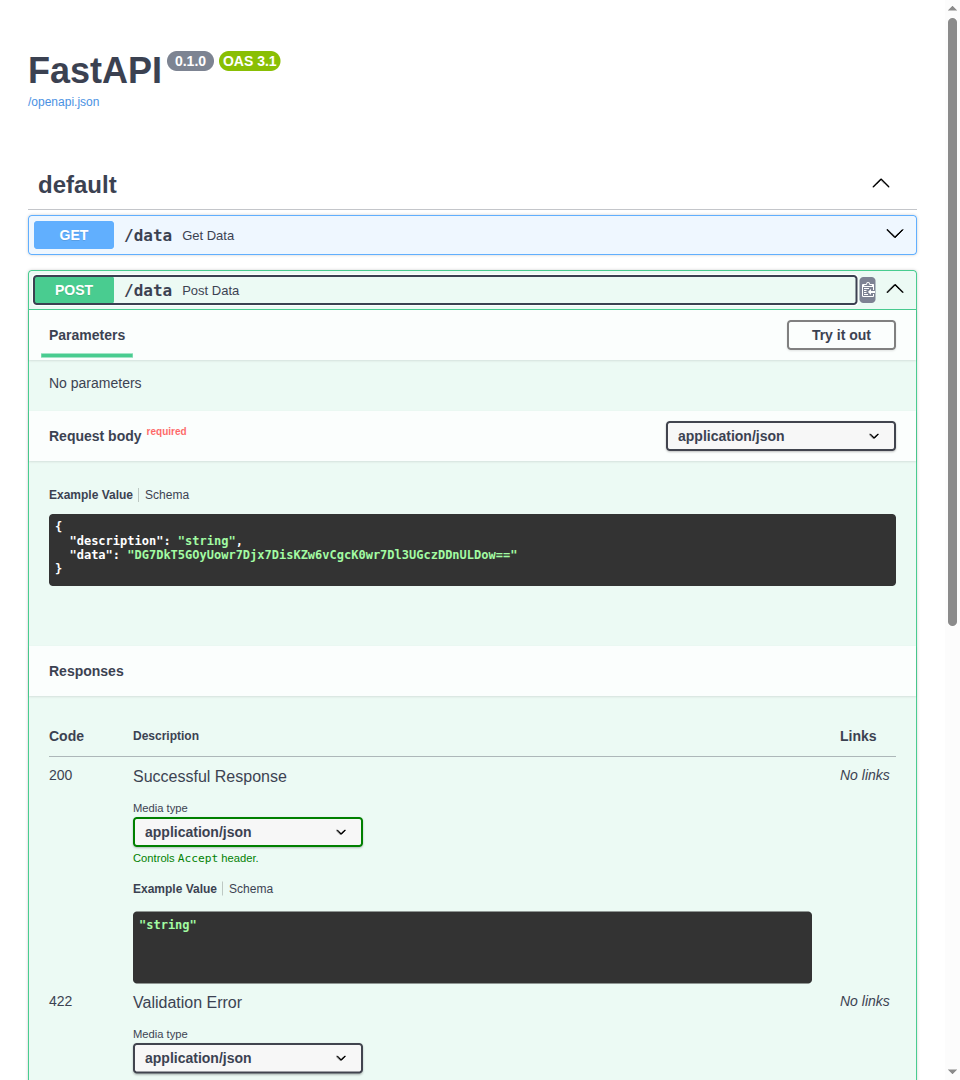
Podrías enviar un request como:
{
    "description": "Some data",
    "data": "aGVsbG8="
}
Consejo
aGVsbG8= es la codificación base64 de hello.
Y luego Pydantic decodificará el string base64 y te dará los bytes originales en el campo data del modelo.
Recibirás una response como:
{
  "description": "Some data",
  "content": "hello"
}
Pydantic bytes para datos de salida
También puedes usar campos bytes con ser_json_bytes en la configuración del modelo para datos de salida, y Pydantic serializará los bytes como base64 al generar la response JSON.
from fastapi import FastAPI
from pydantic import BaseModel

# Code here omitted 👈

class DataOutput(BaseModel):
    description: str
    data: bytes

    model_config = {"ser_json_bytes": "base64"}

# Code here omitted 👈

app = FastAPI()

# Code here omitted 👈

@app.get("/data")
def get_data() -> DataOutput:
    data = "hello".encode("utf-8")
    return DataOutput(description="A plumbus", data=data)

# Code below omitted 👇
👀 Full file preview
from fastapi import FastAPI
from pydantic import BaseModel


class DataInput(BaseModel):
    description: str
    data: bytes

    model_config = {"val_json_bytes": "base64"}


class DataOutput(BaseModel):
    description: str
    data: bytes

    model_config = {"ser_json_bytes": "base64"}


class DataInputOutput(BaseModel):
    description: str
    data: bytes

    model_config = {
        "val_json_bytes": "base64",
        "ser_json_bytes": "base64",
    }


app = FastAPI()


@app.post("/data")
def post_data(body: DataInput):
    content = body.data.decode("utf-8")
    return {"description": body.description, "content": content}


@app.get("/data")
def get_data() -> DataOutput:
    data = "hello".encode("utf-8")
    return DataOutput(description="A plumbus", data=data)


@app.post("/data-in-out")
def post_data_in_out(body: DataInputOutput) -> DataInputOutput:
    return body
Pydantic bytes para datos de entrada y salida
Y por supuesto, puedes usar el mismo modelo configurado para usar base64 para manejar tanto la entrada (validate) con val_json_bytes como la salida (serialize) con ser_json_bytes al recibir y enviar datos JSON.
from fastapi import FastAPI
from pydantic import BaseModel

# Code here omitted 👈

class DataInputOutput(BaseModel):
    description: str
    data: bytes

    model_config = {
        "val_json_bytes": "base64",
        "ser_json_bytes": "base64",
    }

# Code here omitted 👈

app = FastAPI()

# Code here omitted 👈

@app.post("/data-in-out")
def post_data_in_out(body: DataInputOutput) -> DataInputOutput:
    return body
👀 Full file preview
from fastapi import FastAPI
from pydantic import BaseModel


class DataInput(BaseModel):
    description: str
    data: bytes

    model_config = {"val_json_bytes": "base64"}


class DataOutput(BaseModel):
    description: str
    data: bytes

    model_config = {"ser_json_bytes": "base64"}


class DataInputOutput(BaseModel):
    description: str
    data: bytes

    model_config = {
        "val_json_bytes": "base64",
        "ser_json_bytes": "base64",
    }


app = FastAPI()


@app.post("/data")
def post_data(body: DataInput):
    content = body.data.decode("utf-8")
    return {"description": body.description, "content": content}


@app.get("/data")
def get_data() -> DataOutput:
    data = "hello".encode("utf-8")
    return DataOutput(description="A plumbus", data=data)


@app.post("/data-in-out")
def post_data_in_out(body: DataInputOutput) -> DataInputOutput:
    return body